Apple Watch
Your revenue,
on your wrist.
Tivro for Apple Watch taps your wrist for every sale and shows today’s revenue, MRR for each business and every sale as it comes in. Complications put today’s revenue on your watch face, and one tap hides the amounts.

Free download. Explore with sample data, then 14 days free.
Or scan with your
iPhone’s camera
New subscriber 🇳🇱
$59.99
Quillo · Annual Pro
Apple Watch
Your numbers,
a glance away.
Three pages on your wrist, and complications for your watch face. Tap the eye to hide the amounts there when you'd rather keep them to yourself.
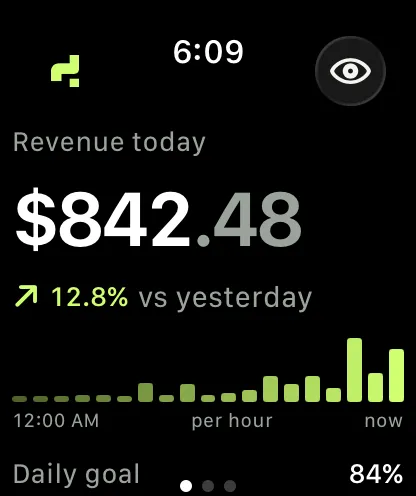
- TodayRevenue so far against your daily goal, hour by hour.
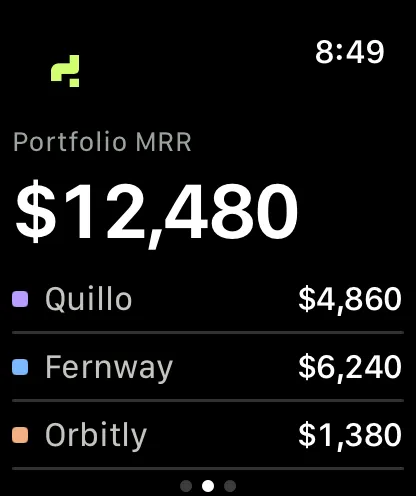
- PortfolioMRR for every business, with your total on top.
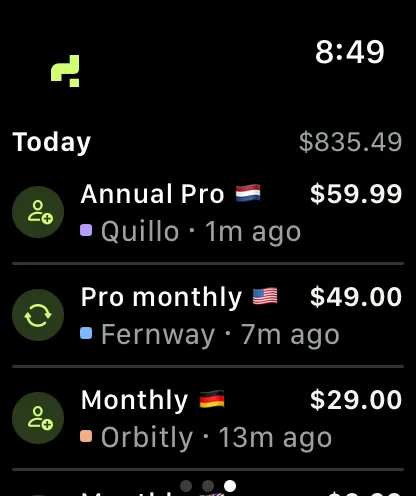
- ActivityEvery sale by day, newest first. Tap one to see it in full.
On your watch face
Today’s revenue,
at a glance.
One complication, Revenue today, in the four shapes watch faces use. Touch and hold your watch face, tap Edit and choose Tivro.
Rectangular
Revenue today in full, with a bar filling towards your daily goal.
Circular
A ring that fills as today’s revenue nears your goal, with the amount inside.
Corner
The same ring, curved round the corner of faces like Infograph.
Inline
Revenue today as one line of text, above the time on faces that have one.
Three pages
Everything,
one swipe away.
- Today. Revenue so far against your daily goal, with the hours it came in.
- Portfolio. MRR for every business, and how much each one adds.
- Activity. Today’s sales as they arrive, with what sold and where.
- Every alert, on your wrist. With your iPhone locked, each sale taps your wrist with its own haptic.
- Private when you want. Tap the eye to hide the amounts, on the watch and its face.
Set it up
On your wrist
in a minute.
- 1
Install it
On your iPhone, open the Watch app and install Tivro from Available Apps.
- 2
Add a complication
Touch and hold your watch face, tap Edit, and choose Tivro for a complication.
- 3
Set your daily goal
In Tivro’s Watch tab on your iPhone, set the revenue you aim for each day.
Questions
Questions,
answered.
Can I see my Stripe or App Store revenue on my Apple Watch?
Yes. Tivro brings sales from the App Store, RevenueCat, Stripe, Paddle, Polar and Mollie to Apple Watch: a tap on your wrist for each sale, a watch app with today’s revenue and MRR for each business, and complications for your watch face.
Do I need an Apple Watch to use Tivro?
No. Every alert arrives on your iPhone. The watch adds the tap on your wrist, its own pages and complications for your watch face.
Which Apple Watch models work?
Any Apple Watch with watchOS 10 or later, paired with an iPhone running iOS 15 or later. Install Tivro from the Watch app on your iPhone, under Available Apps.
Does the watch face update in real time?
The watch app does. Apple decides how often complications refresh, so the watch face can lag a little behind; Tivro always shows when its numbers were last updated.
Can I hide my revenue on my watch?
Yes. Tap the eye at the top of Tivro on your watch, or turn on Hide amounts on watch face in Tivro’s Watch tab on your iPhone. The watch face then shows how far you are towards your daily goal instead of the amount.
What is the daily goal?
The revenue, after refunds, you aim for each day, set in Tivro’s Watch tab. The watch app, the complications and the widgets show today’s revenue against it.

Your next sale
is a tap away.
Tivro for iPhone and Apple Watch.
Free download. Explore with sample data, then 14 days free.
Or scan with your
iPhone’s camera