The short answer
You can get a notification for every Stripe payment in three ways. Stripe’s free Dashboard app pushes new payments, emails can tell you about each successful payment, and an alerts app like Tivro taps your iPhone and Apple Watch with a different sound for a new subscriber, a sale, a renewal or a refund. Each takes about a minute to set up.
A Stripe payment notification is a message on your phone the moment a customer pays you through Stripe. Stripe sends a webhook event for every successful payment, and any app that listens for it can turn it into a notification on your iPhone and, when your iPhone is locked, a tap on your Apple Watch.
There are three practical ways to get one. They differ in what the notification tells you, how it sounds, and whether it reaches your wrist.
Option 1: Stripe’s Dashboard app
Stripe’s own app is free and is the quickest place to start.
- Install Stripe Dashboard from the App Store and sign in.
- When it asks, allow notifications. If you said no earlier, open Settings › Notifications › Stripe on your iPhone and turn on Allow Notifications.
- In the app, turn on push notifications for New payments.
Stripe’s documentation lists five kinds of push notification: new payments, new customers, disputed payments, deposited transfers and a daily summary. The app also has widgets for your iPhone’s Lock Screen.
Where it stops: Stripe decides what each notification looks and sounds like, and it covers Stripe only. If you also sell through the App Store, Paddle or anything else, you need another app for each. There’s no Apple Watch app either; notifications reach your watch the way every iPhone notification does.
Option 2: An email for every successful payment
If you live in your inbox, Stripe can email you instead.
- In the Stripe Dashboard, open Settings, then Communication preferences under your personal settings.
- Choose the Transactions and balances tab and scroll to Payments.
- Tick Email next to Successful payments.
To feel these on your phone, turn on notifications for your mail app, or mark Stripe’s address as a VIP in Apple Mail. It works, but each sale lands between everything else in your inbox, and the alert is only as quick as your mail.
Option 3: An alerts app like Tivro
Tivro is an iPhone and Apple Watch app made for this one moment. It installs on your Stripe account from the Stripe App Marketplace with read-only access:
- Open gettivro.com/stripe or find Tivro in the Stripe App Marketplace, and choose Install.
- Pick your Stripe account and approve read-only access.
- Scan the code with your iPhone. Tivro opens and adds the business, named after your Stripe account.
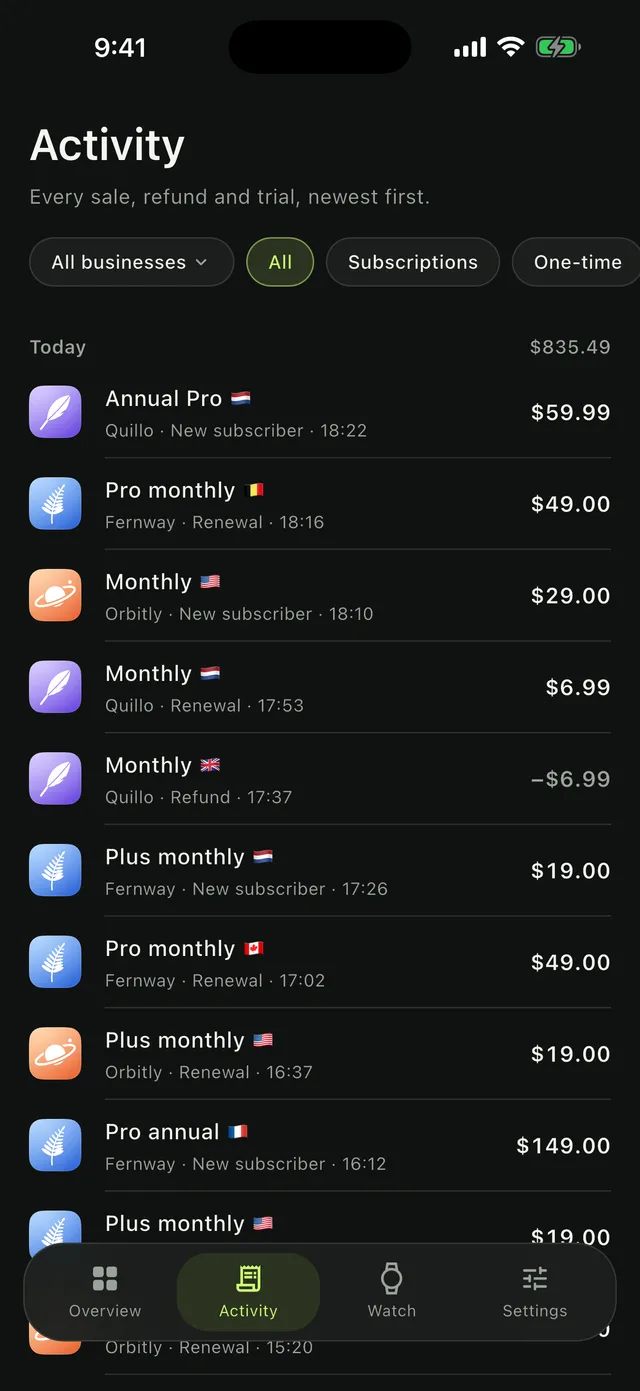
From then on, Stripe tells Tivro about every payment as it happens, and Tivro taps your iPhone and Apple Watch within seconds. What you get on top of a plain notification:
- A sound and a tap for each kind of sale. A new subscriber plays a three-note chime with a rising double tap; a renewal is a soft note and a light click. You know what happened before you look.
- A setting for each kind. New subscribers can break through a Focus, renewals can stay quiet in the app, refunds can stay silent.
- Your Apple Watch. Alerts on your wrist, a watch app with today’s revenue and every sale, and complications for your watch face.
- Your MRR at a glance, on Home Screen and Lock Screen widgets, with a morning summary of yesterday.
- Every other place you sell. The App Store, RevenueCat, Paddle, Polar and Mollie, added up in your currency.
The three options side by side
| Stripe Dashboard app | Tivro | ||
|---|---|---|---|
| Speed | Instant push | As fast as your mail | Within seconds |
| Sound | Set by Stripe | Your mail sound | A chime and a haptic for each kind |
| Apple Watch | Notifications only | Mail notifications | Watch app, alerts and complications |
| Lock Screen | Widgets | None | Revenue today and MRR widgets |
| Other sources | Stripe only | Stripe only | App Store, RevenueCat, Paddle, Polar, Mollie |
| Price | Free | Free | Free to explore, membership from $14.99 a month |
Use Stripe’s app if Stripe is the only place you sell and a plain notification is enough. Use Tivro if you want to feel the difference between a new subscriber and a renewal, see sales on your wrist, or follow more than one business.
Getting the alerts on your Apple Watch
Apple sends each notification to your iPhone or your Apple Watch, not both. If your iPhone is unlocked, it shows there. If your iPhone is locked or asleep, it goes to your watch, as long as the watch is unlocked and on your wrist.
To check an app’s setting, open the Watch app on your iPhone, tap Notifications, then the app. Mirror my iPhone uses the same setting as your iPhone. Tivro’s alerts also come with their own haptic on the watch, so a new subscriber feels different from a renewal.
Letting sales through a Focus
A Focus like Work or Sleep silences notifications from apps you haven’t allowed. To let sales through, add the app under Settings › Focus › your Focus › Apps. In Tivro you can also set a kind of sale to Focus: it then arrives as a Time Sensitive notification, which breaks through unless you’ve turned that off for Tivro.
If you’d rather build it yourself
Developers can listen for Stripe’s webhook events on their own server, like payment_intent.succeeded for a one-time payment or invoice.paid for a subscription invoice, and forward each to a push service. It’s a fun afternoon. Keeping it running, deduplicating retries and telling a first invoice from a renewal is the part that takes longer.