The short answer
The App Store Connect app doesn’t send a notification when someone buys from your app, and its sales figures arrive hours later. Real-time sales come from App Store Server Notifications, which Apple sends to a web address you choose within seconds of each purchase. Point them at your own server, at RevenueCat, or at an app like Tivro, which turns each one into a notification on your iPhone and Apple Watch.
An App Store sales notification is an alert on your phone when someone buys, subscribes, renews or asks for a refund in your app. Apple has all the data, but it doesn’t send that alert to you. You have to collect it yourself, from the right place.
What Apple gives you out of the box
The App Store Connect app for iPhone shows your sales and sends push notifications, but not for sales. Apple lists its notifications as app status changes, new customer reviews, tester feedback and featuring on the App Store.
Sales and Trends shows units, sales and proceeds. Apple describes the last 24 hours as “generally available within two hours”, and the reports you download are ready the following day, usually by 8 a.m. Pacific Time. They’re estimates in US dollars, based on the previous month’s exchange rates.
Both are fine for a weekly look. Neither tells you that somebody subscribed a minute ago.
Where real-time sales come from
Apple’s App Store Server Notifications are the real-time source. For every purchase, renewal, refund and change to a subscription, Apple sends a signed message to the web address you set for your app. Apple’s engineers say they generally send them “within a few seconds of the underlying event”.
Version 2 of these notifications tells you what happened in two parts, a type and a subtype:
- SUBSCRIBED for a new subscriber, with the subtype telling you whether it’s a first purchase or someone coming back
- DID_RENEW for a renewal
- ONE_TIME_CHARGE for a one-time purchase, like a lifetime unlock
- REFUND when Apple refunds a customer
You set the address in App Store Connect, under your app’s App Information, in the App Store Server Notifications section. There’s one production address and one for the sandbox, per app.
Three ways to turn them into notifications
1. Your own server
Receive Apple’s notifications on a server, verify the signature, work out what kind of sale it is and send yourself a push notification. It’s the most flexible route, and you’re also the one who keeps it running at three in the morning.
2. RevenueCat
If your app already uses RevenueCat for in-app purchases, RevenueCat receives Apple’s notifications for you. Its iPhone app can notify you when a purchase is made. Tivro can connect to RevenueCat too, if you’d like the sales on your Apple Watch.
3. Tivro, straight from Apple
Tivro connects to App Store Connect with an API key and doesn’t need RevenueCat or a server:
- Create a Team Key in App Store Connect with Admin access, or Sales or Finance. There’s a step-by-step guide.
- In Tivro, tap Add a business › App Store and add the Issuer ID, the Key ID, the key file and your vendor number. Each app becomes a business, with its own icon.
- Turn on instant sales. With an Admin key, Tivro sets your apps’ notification address itself. With Sales or Finance, you paste the link Tivro shows into each app’s App Information.
From then on, every new subscriber, purchase, trial, renewal and refund taps your iPhone and Apple Watch within seconds, with the product, the amount and the buyer’s country.
How fast each one is
| Source | When you see a sale | Notification on your phone |
|---|---|---|
| Sales and Trends, last 24 hours | Generally within two hours | No |
| Daily sales reports | The next day | No |
| App Store Server Notifications | Generally within seconds | Only through a server, RevenueCat or Tivro |
If your app already sends its notifications somewhere
Each app has one production address. If it already points at RevenueCat or your own server, Tivro leaves it alone: that app’s sales come in from Apple’s daily reports the next day instead. To get them within seconds, connect through RevenueCat, or forward Apple’s notifications from your server to the link Tivro shows for the app.
Either way, Tivro checks Apple’s daily reports against what the notifications recorded, so a missed notification doesn’t mean a missing sale.
What a notification shows
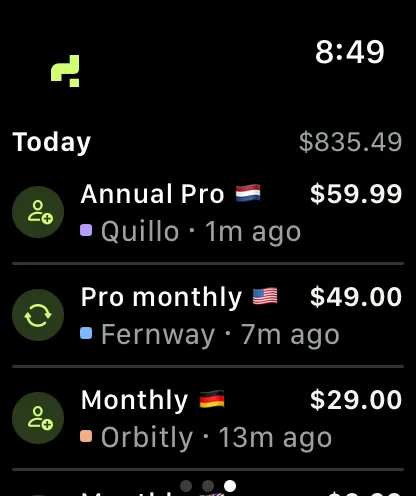
With Tivro, a new subscriber in the Netherlands buying a yearly plan looks like this on your Lock Screen: the business, New subscriber with the Dutch flag, and the product and amount underneath. On your Apple Watch, it arrives with its own haptic, and the watch app keeps the day’s sales one swipe away.