The short answer
RevenueCat’s official app runs on iPhone, iPad, Mac and Apple Vision Pro, but not on Apple Watch, so its purchase notifications only reach your watch as mirrored iPhone notifications. For a real watch app, connect RevenueCat to Tivro. It adds a webhook to each project, taps your wrist for every sale within seconds, and puts today’s revenue and MRR on your watch face and Lock Screen.
RevenueCat is the subscription backend behind thousands of iOS apps. It knows the moment somebody subscribes, renews or asks for a refund. Getting that moment onto your Apple Watch takes one extra step, because RevenueCat doesn’t make a watch app.
What RevenueCat’s own app does
RevenueCat’s official app is free with any RevenueCat account and needs iOS 18 or later. According to its App Store listing, it gives you:
- Notifications when a purchase is made, with the subscriber’s country flag and a choice of sound themes
- Widgets for active trials, a live transaction feed and key metrics like ARR
- Siri and App Shortcuts to ask for your MRR, revenue, active subscriptions and trials
- Charts, customer history and paywall previews
It runs on iPhone, iPad, Mac and Apple Vision Pro. There’s no Apple Watch app.
Getting RevenueCat’s notifications on your watch
Without a watch app, RevenueCat’s notifications reach your wrist the way every iPhone notification does: only when your iPhone is locked or asleep, and your Apple Watch is unlocked.
To check it, open the Watch app on your iPhone, tap Notifications, then RevenueCat, and choose Mirror my iPhone. That’s as far as it goes: a notification you can read, without a glance at today’s revenue or anything on your watch face.
A real Apple Watch app for RevenueCat
Tivro connects to RevenueCat and brings each project to your iPhone and Apple Watch:
- In Tivro, tap Add a business › RevenueCat and sign in with RevenueCat. A secret API key (v2) works too.
- Pick your projects. Each one becomes a business, with its App Store icon.
- Tivro adds a webhook to each project, and RevenueCat sends it every event from then on.
Within seconds of each new subscriber, trial, renewal, purchase or refund, your wrist taps with a haptic of its own. On the watch itself, Tivro has three pages:
- Today: revenue so far against your daily goal, with the hours it came in.
- Portfolio: MRR for every business, and how much each one adds.
- Activity: today’s sales as they arrive, with what sold and where.
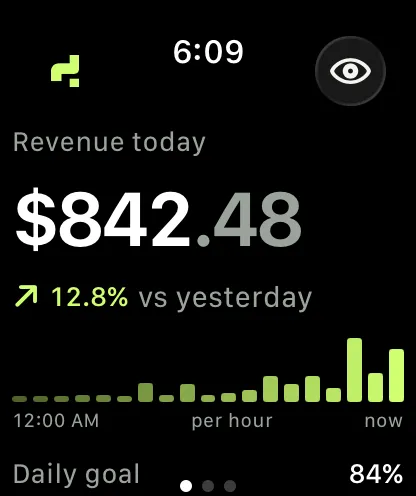
On your watch face
Tivro’s complications put revenue today on your watch face, in four shapes:
- Rectangular: revenue today in full, with a bar filling towards your daily goal.
- Circular: a ring that fills as today’s revenue nears your goal, with the amount inside.
- Corner: the same ring, curved round the corner of faces like Infograph.
- Inline: revenue today as one line of text above the time.
Tap the eye in the watch app to hide the amounts, on the watch and its face.
On your Lock Screen
Both apps have iPhone widgets. Tivro’s show revenue today on the Home Screen and Lock Screen, in small, medium, circular, rectangular and inline sizes, and MRR in small, medium and rectangular. Each can hide its amounts, which is handy on a Lock Screen others can see.
RevenueCat’s app and Tivro side by side
| RevenueCat app | Tivro | |
|---|---|---|
| Purchase notifications | Yes, with sound themes | Yes, with a sound and haptic for each kind |
| Apple Watch app | No | Today, Portfolio and Activity |
| Watch face complications | No | Four shapes, with a daily goal |
| Lock Screen widgets | Yes | Revenue today and MRR |
| Other sources | RevenueCat only | App Store, Stripe, Paddle, Polar, Mollie |
| Charts and customer history | In depth | MRR, revenue, churn and top countries |
| Price | Free | Free to explore, membership from $14.99 a month |
They’re made for different moments. RevenueCat’s app is the place to dig into charts and customers. Tivro is for feeling each sale as it happens, on your wrist, across every business you run.
Things worth knowing
- Sandbox purchases are left out by default. Turn on Include RevenueCat sandbox in Tivro’s Settings to see test purchases too.
- Web purchases that RevenueCat also reports from Stripe, Paddle, Polar or Mollie are counted once, in your MRR, your revenue and your alerts, if you connect both.
- Every store RevenueCat supports comes through, with the store shown on each sale.