The short answer
The best Apple Watch apps for founders put what you’d otherwise check your phone for on your wrist. For revenue, Tivro taps you for every sale from six sources, RCKit covers RevenueCat and App Store Connect, and Numerics turns any metric into a complication. For your day, Things shows today’s to-dos and Fantastical your next meeting.
The best Apple Watch apps for founders are the ones that save you a trip to your phone: your sales, your next meeting and today’s to-dos, on your wrist and your watch face. Every time you pick up your phone to check a number, the phone wins a little of your attention. A glance at your wrist doesn’t.
Here are six worth wearing, grouped by what they’re for.
At a glance
| App | On your wrist | Price |
|---|---|---|
| Tivro | Every sale, revenue today, MRR for each business | $14.99 a month or $119.99 a year |
| RCKit | RevenueCat and App Store Connect: today, goals and the last sale | Free under $100 a month in revenue, then from $1.99 a month |
| SaaSquatch | Stripe MRR, ARR and subscriptions | Free; in-app purchases |
| Numerics | Any metric you choose, from dozens of services | 3 metrics free; Pro $5 a month |
| Things | Today’s to-dos and your progress through them | Included with Things for iPhone |
| Fantastical | Your next event and today’s schedule | Watch app needs Flexibits Premium |
For your revenue
Tivro
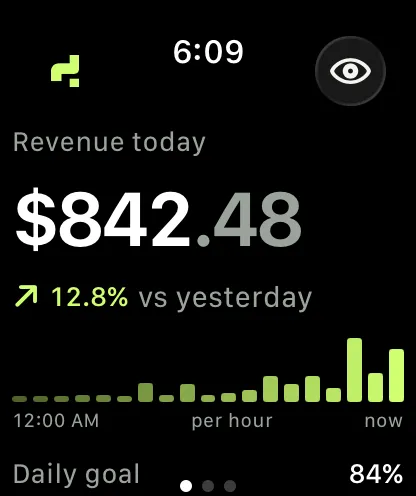
Tivro is a calm revenue companion for iPhone and Apple Watch, and our own app. It taps your wrist for every new subscriber, one-time sale, trial, renewal and refund, each with a haptic of its own, from the App Store, RevenueCat, Stripe, Paddle, Polar and Mollie.
- Three pages: Today, with revenue so far against your daily goal; Portfolio, with MRR for every business; and Activity, with today’s sales as they arrive.
- Four complications: rectangular, circular, corner and inline, each with revenue today.
- Private on your face: hide the amounts and show progress towards your goal instead.
RCKit
A third-party app for RevenueCat and App Store Connect, with AppFigures and others, on iPhone, iPad, Mac, Apple Watch and Apple TV. RevenueCat sales arrive live, App Store Connect data daily, and the watch shows today, your goals and the last sale, with complications.
Worth knowing: free while your apps earn under $100 a month, then from $1.99 a month. It’s for app developers; there’s no Stripe or Paddle.
SaaSquatch
An unofficial Stripe stats viewer for MRR, ARR and active subscriptions, with a watch app and Home Screen widgets. Free, with in-app purchases to unlock everything.
Numerics
A dashboard app that connects to dozens of services, Stripe among them, and puts any number you choose on your watch and in a watch face complication. Free for 3 metrics; Pro, $5 a month, unlocks all integrations.
Worth knowing: you build the dashboard yourself, and it shows numbers rather than telling you about each sale.
For your day
Things
The to-do app’s watch version shows your Today list and nothing else, so you can tick things off as you go. Its complications show your progress as a ring, your next one or three to-dos, or a + button for adding one by voice.
Worth knowing: the watch app comes with Things for iPhone, a one-time purchase. Complications update when you open the watch app.
Fantastical
The calendar app has eight watch complications, from your next event to today’s schedule and remaining tasks, four of which you can set to show only certain calendars.
Worth knowing: the watch app needs a Flexibits Premium subscription, with a 14-day free trial.
Set up your watch for focus
A few settings make any of these work better:
- Turn off mirrored notifications for apps that don’t deserve your wrist. On iPhone, open the Watch app › Notifications.
- Use Focus. Focus modes on your iPhone apply to your watch too, so a work Focus can let sales through and keep social apps quiet.
- Build one face for work with the complications above, and swipe to it when the day starts.